
PacketSafari PCAP Sanitization
 Oliver Ripka
PacketSafari is proud to announce our most requested feature: in-memory PCAP sanitization. This process involves stripping away sensitive or unnecessary data from PCAP files while retaining only the essential header information.
Why Sanitize PCAPs?
- Protecting Sensitive Data: PCAPs can capture far more than just network headers; they often include application payloads, personal data, or proprietary information. Sanitizing these files ensures that only the essential header information is retained, significantly reducing the risk of exposing sensitive data.
- Enhancing Data Security: By removing unnecessary details, the sanitization process minimizes the risk of data leaks and aids in complying with privacy regulations. This is particularly crucial in multi-tenant SaaS environments where protecting customer data is of utmost importance.
Our implementation
In this release, we introduce slicing mode as the primary sanitization approach. You can now choose to sanitize files upon upload, ensuring your data is protected from the start. Slicing mode is designed to be the safest option to remove data by ensuring that only packet information up to a certain offset is retained. For users who also wish to anonymize IP, Ethernet, and other headers while still prioritizing privacy, we offer the deep anonymization option.
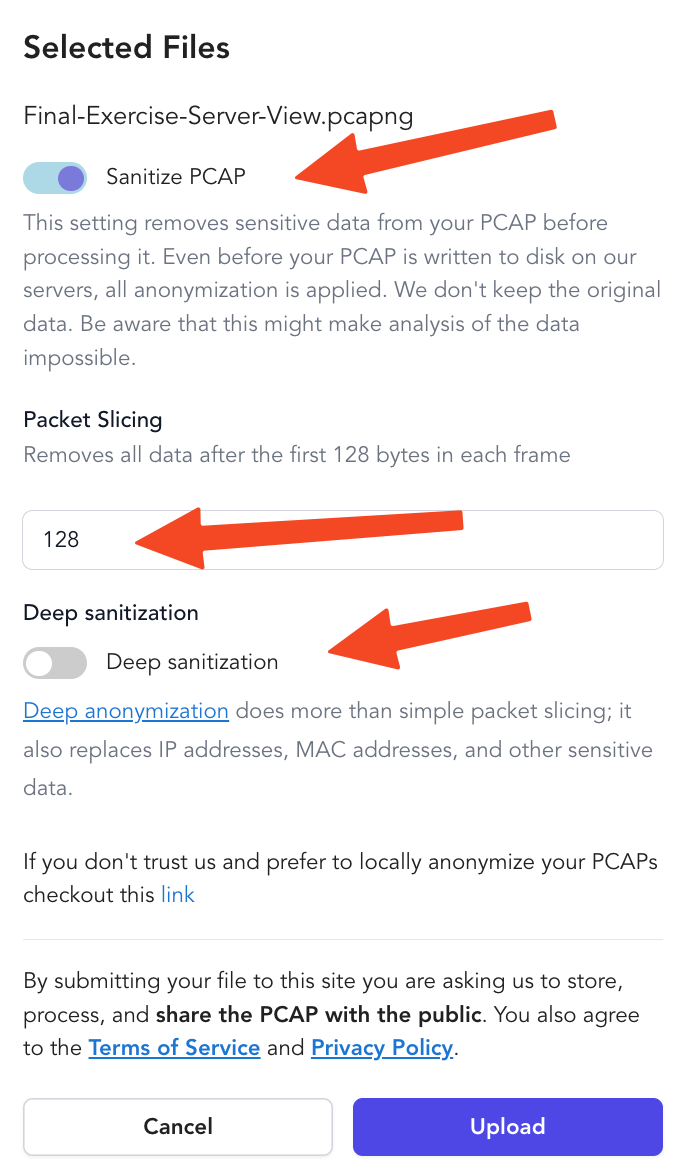
Upload your PCAPs here
Slicing Mode: The Safest Approach for Data Privacy
In slicing mode, PacketSafari truncates packet payload after the useful header boundary. The open-source anoncap default now uses boundary-only adaptive slicing: it preserves supported L2/L3/L4, tunnel, and ICMP quote headers, then removes bytes beyond that computed boundary. This method avoids a fixed default byte count while still minimizing the risk of exposing application-level data.
Key Features of Slicing Mode
- Data Removal: Supported header structure is preserved and payload beyond the safe boundary is removed by default.
- Fast and Efficient: The algorithm truncates at computed protocol boundaries without requiring deep payload parsing.
- Ideal for High-Security Environments: Perfect for scenarios where absolute data sanitization is required to prevent any sensitive information leakage.
Deep Anonymization
Although slicing mode ensures maximum safety by removing nearly all payload data, there are situations where you may need to anonymize additional details such as MAC addresses and IP addresses. For these cases, PacketSafari offers the deep anonymization option.
How Deep Anonymization Works
In deep mode, the sanitization algorithm processes each packet in detail to anonymize specific fields while recalculating checksums to maintain protocol integrity. This approach retains more of the packet's structure, which can be crucial for analysis by advanced tools or LLMs (Large Language Models). The following protocols and fields are processed:
- Ethernet Layer:
- MAC Addresses: Both source and destination addresses are anonymized using a hash-based mapping while preserving broadcast and multicast addresses.
- IPv4 and IPv6 Layers:
- IP Addresses: Sensitive addresses are modified (except for special cases such as loopback, multicast, or broadcast addresses). Recalculation of checksums ensures packet validity.
- ARP, ICMP/ICMPv6, DNS, DHCP/BOOTP, DHCPv6, and RIP:
- Protocol-Specific Fields: Each of these protocols has key fields that are sanitized, such as anonymizing ARP hardware addresses or modifying ICMP IDs and sequence numbers.
Both modes can be used together. Slicing is active by default in standalone anoncap. Use --explain-defaults to inspect the shipped behavior, --public-share to make the public default explicit (--nano-trace is a short alias) in scripts, and --paranoid for slower audit runs with validation and leak scanning. Use a fixed --snaplen only when you need a minimum retained byte count, or use --unsupported-payload-policy keep when a private/deep rules profile must retain payload bytes for semantic anonymization.
Why In-Memory Sanitization?
Both the slicing and deep anonymization modes operate entirely in memory. This design ensures that sensitive data is never written to disk, thereby reducing the risk of data exposure. By processing PCAP files solely in memory, PacketSafari maintains a high standard of security during file uploads and analysis.
Additional Resources
For users who prefer to sanitize PCAP files on their own system, we recommend reviewing our detailed guide on manual anonymization. This guide explains various tools and techniques you can use offline if you do not fully trust our algorithm:
PacketSafari continues to evolve based on your feedback. Whether you choose the highly secure slicing mode to protect application layer data or opt for the more detailed deep anonymization for comprehensive analysis, our new sanitization features are designed to meet your security and analytical needs without compromise.